
Active Matter PC requirements and console modes.
Compare the official PC chart with your hardware, distinguish resolution targets from measured performance, and choose between the console modes listed by the developer. These are published targets, not our benchmarks.
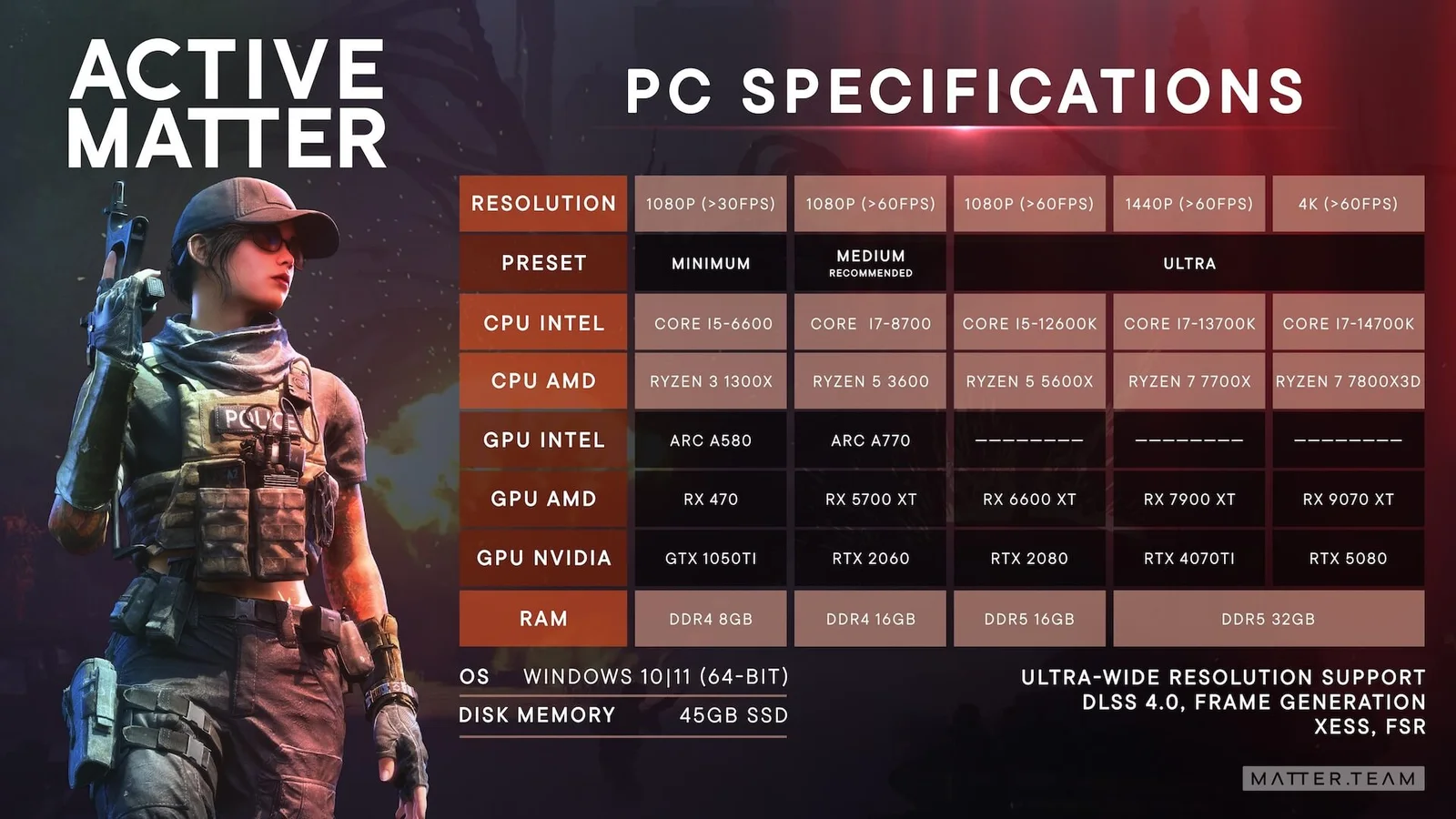
PC resolution and hardware targets
The table below transcribes the official PC specification visual linked from the FAQ. “Target” means the chart’s label; it does not mean this site tested the result on your machine.
| Chart target | CPU Intel / AMD | GPU Intel / AMD / NVIDIA | RAM |
|---|---|---|---|
| Minimum 1080p >30 FPS | Core i5-6600 Ryzen 3 1300X | Arc A580 RX 470 GTX 1050 Ti | DDR4 8GB |
| Medium Recommended 1080p >60 FPS | Core i7-8700 Ryzen 5 3600 | Arc A770 RX 5700 XT RTX 2060 | DDR4 16GB |
| Ultra 1080p >60 FPS | Core i5-12600K Ryzen 5 5600X | RX 6600 XT RTX 2080 | DDR5 16GB |
| Ultra 1440p >60 FPS | Core i7-13700K Ryzen 7 7700X | RX 7900 XT RTX 4070 Ti | DDR5 32GB |
| Ultra 4K >60 FPS | Core i7-14700K Ryzen 7 7800X3D | RX 9070 XT RTX 5080 | DDR5 32GB |
Other chart labels
The same official visual lists Windows 10/11 64-bit, 45 GB of available SSD storage, ultra-wide resolution support, DLSS 4.0, frame generation, XeSS and FSR. Feature availability can still depend on hardware and the current build.
Two source details to check before buying hardware
Recommended Intel CPU: the sources disagree
The FAQ chart says Core i7-8700; Steam’s recommended requirements say Core i5-8700. The table above preserves the chart label. We cannot establish which label the publisher intends, so do not use this disputed row alone to make a purchase. Ask Gaijin support (external) ↗ for clarification.
The chart also labels the Ultra 1080p memory row “DDR5 16GB” alongside a Ryzen 5 5600X option. AMD’s specification for that processor lists DDR4. Treat these as separate performance reference entries, not a verified compatible parts list; check the CPU and motherboard’s supported memory before upgrading.
Sources Official FAQ: PC specification chart (external) ↗ · Steam: minimum and recommended requirements (external) ↗ · AMD Ryzen 5 5600X specification (external) ↗.
Use a chart row as a starting preset
- Match the resolution first. The Medium recommended row is for 1080p; it does not promise the same result at 1440p or 4K.
- Compare CPU, GPU and RAM together. A matching GPU alone is not enough to claim the row’s target.
- Separate target FPS from measured FPS. PC labels use “above 30” or “above 60”; console labels are 30 or 60 FPS targets. Neither is an independent benchmark.
- Check storage separately. Steam lists 45 GB of available space and requires an SSD. This is storage capacity, not RAM.
If performance changes mainly while aiming through a scope, update 0.4.0.73 specifically mentions performance work on “realistic magnification in scopes” in forest areas. That is a setting to compare on your own machine, not evidence that disabling it guarantees an FPS gain.
The chart lists DLSS 4.0, frame generation, XeSS and FSR. It does not say every listed GPU supports every option, nor whether generated frames are included in each target.
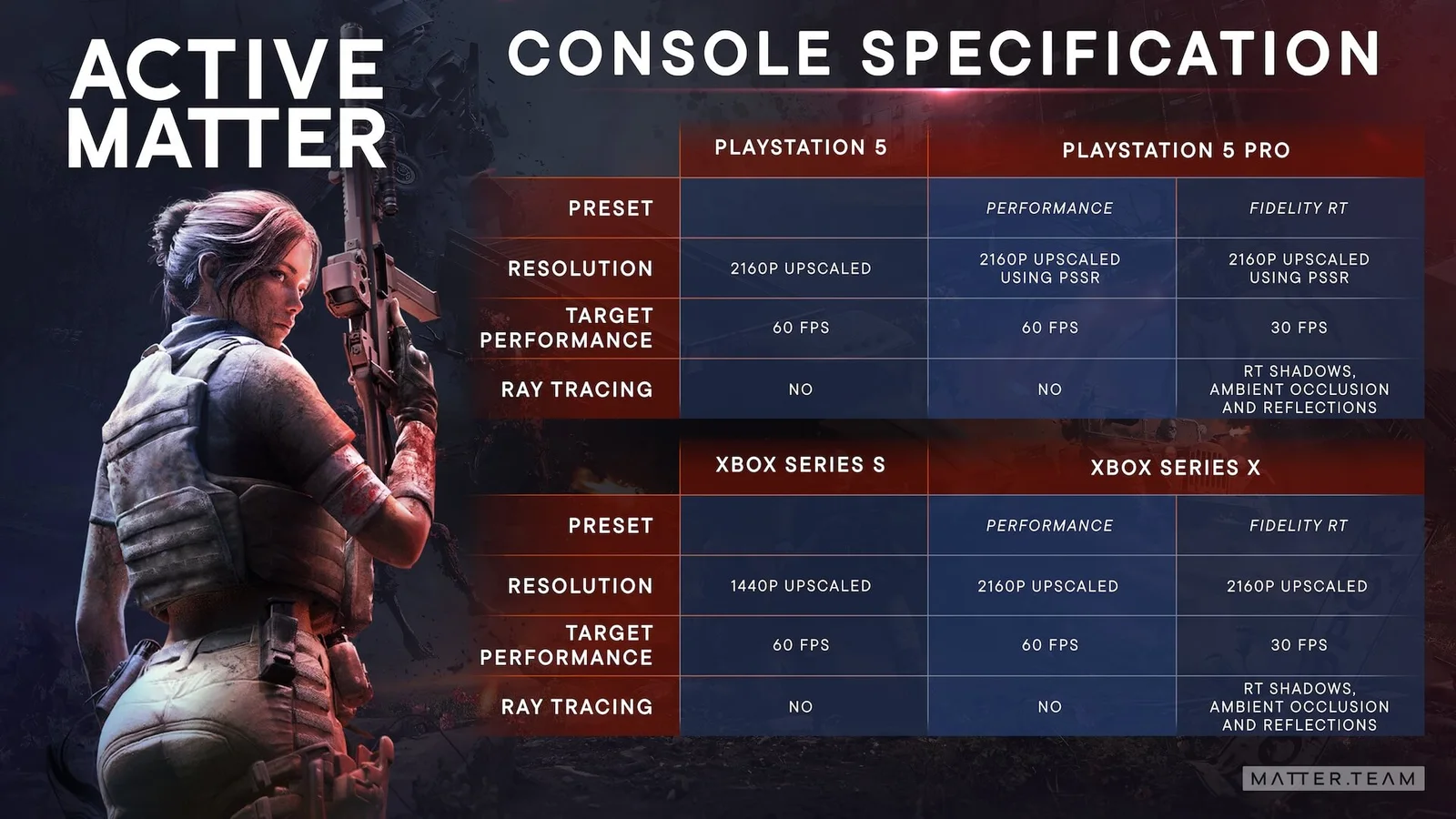
Console targets shown in the official visual
The console chart distinguishes base hardware from performance and fidelity ray-tracing presets. These are published targets, not measurements made by this site.
| System / preset | Resolution | Chart target | Ray tracing |
|---|---|---|---|
| PlayStation 5 | 2160p upscaled | 60 FPS | No |
| PlayStation 5 Pro Performance | 2160p upscaled using PSSR | 60 FPS | No |
| PlayStation 5 Pro Fidelity RT | 2160p upscaled using PSSR | 30 FPS | RT shadows, ambient occlusion and reflections |
| Xbox Series S | 1440p upscaled | 60 FPS | No |
| Xbox Series X Performance | 2160p upscaled | 60 FPS | No |
| Xbox Series X Fidelity RT | 2160p upscaled | 30 FPS | RT shadows, ambient occlusion and reflections |
Choosing a console mode
For the chart’s 60 FPS target, PS5 Pro and Xbox Series X list Performance. Their Fidelity RT modes target 30 FPS and add ray-traced shadows, ambient occlusion and reflections. Base PS5 and Series S are listed at 60 FPS without ray tracing.
All listed console resolutions are upscaled. PS5 Pro identifies PSSR; do not read “2160p upscaled” as a native 4K rendering claim.
Check Linux, Steam Deck and progress-sharing support · Return to the guide library
Driver resets and current performance fixes
Update 0.4.0.115 adds recovery when the video driver resets; previously that event closed the game. It also addresses reported periodic performance drops and incorrect water rendering through optics. Update 0.4.0.122 fixes some combat-entry performance drops with film grain enabled, while 0.4.0.132 targets stutter when equipping armor and loading-screen visual artifacts.
These are developer patch descriptions, not measured evidence that every crash, frame-time spike or stutter is resolved. If a problem continues on 0.4.0.132 or later, record your GPU, driver version, graphics preset, film-grain setting and the action that preceded it for Gaijin support (external) ↗. No universal driver workaround or FPS gain is established here.
Match the 0.4.0.173 fix to the symptom
The October 5 update addresses environment-rendering faults associated with client hangs or graphics-device resets, rare Vulkan artifacts on AMD/Intel GPUs, and performance in areas dense with vegetation and small objects. It also fixes a crash when finishing an Isolated Raid on PlayStation. Check the installed version first; distinguish visual corruption, a driver reset and a raid-completion crash when reporting a remaining problem. These notes contain no measured FPS gain or universal settings fix.
October 5 graphics, performance and PlayStation fixes (external) ↗.
Which engine does Active Matter use?
The official FAQ names Dagor Engine. The engine name alone does not establish performance on your hardware; use the resolution and hardware tables above.
Verification 0.4.0.115 graphics and performance (external) ↗ · 0.4.0.122 film-grain fix (external) ↗ · 0.4.0.132 stutter and loading fixes (external) ↗ · official engine answer (external) ↗.
Reduce walking camera sway
The September 24 update adds a walking-sway reduction setting. It also removes extraction shaking and certain portal ripples, and reduces explosion double vision. If walking movement is the problem, compare the sway setting; the other effects changed with the patch and are not documented here as separate switches.